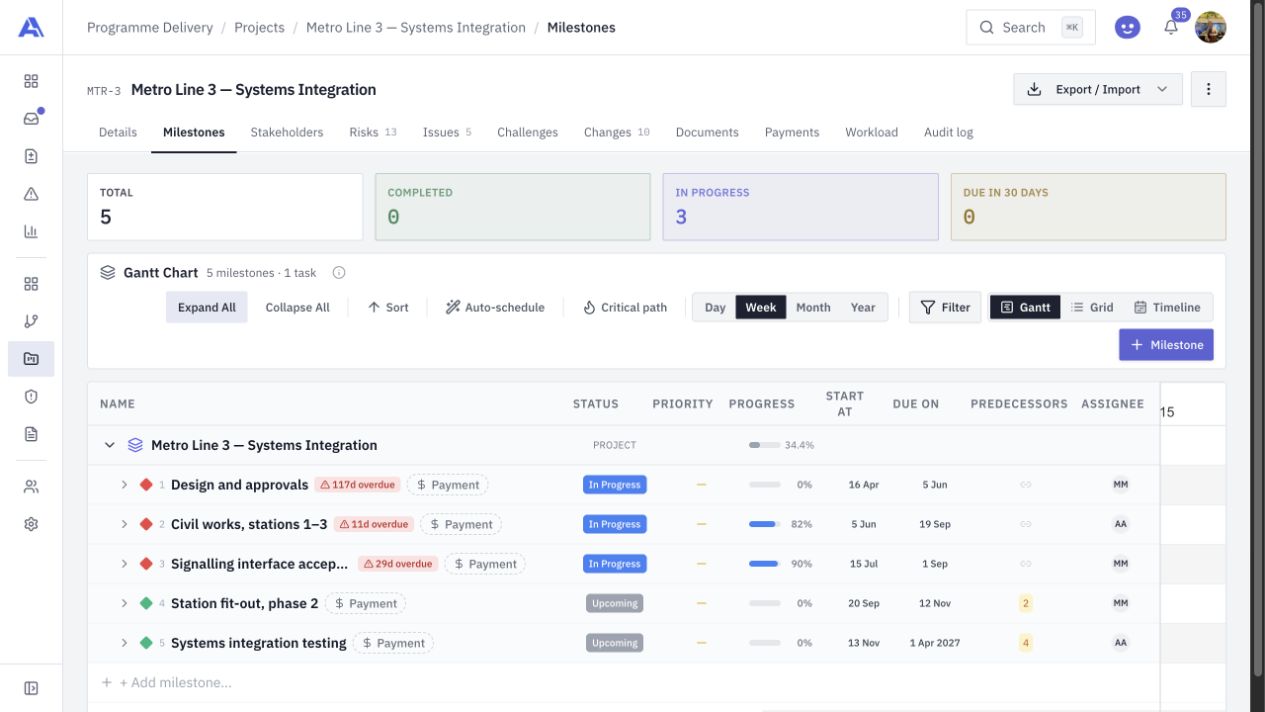
Choose the right view
Use Gantt for the sequence of work, the grid for project detail and the timeline for the delivery picture. The views refer to the same underlying plan.

PROJECT PLANNING & DELIVERY
Keep milestones, tasks, dependencies and accountable owners together. Move between Gantt, grid and timeline views while the project’s evidence and decisions stay within reach.
THE CONNECTED WORKFLOW
Dates tell only part of the story. Delivery teams also need to understand what depends on what, who is responsible and which changes have been approved. AEVU places the plan inside a complete project workspace.
Use Gantt for the sequence of work, the grid for project detail and the timeline for the delivery picture. The views refer to the same underlying plan.
Maintain task and milestone relationships, review the critical path and use the working calendar to understand scheduling constraints.
Move from the plan to stakeholders, risks, documents, workload and payments without losing the project context.
FROM QUESTION TO ACTION
Choose a blank project or an industry starter, confirm the delivery profile, then establish the project dates and team.
Create the milestones and tasks, assign real owners and record the dependencies that determine the sequence.
Review schedule impact through the change workflow. Apply authorised changes deliberately, with the baseline and history in view.
A CLOSER LOOK
The live project plan includes Gantt, grid and timeline views. Teams can use the view that fits the conversation while maintaining one set of project records.
AEVU has workspace working calendars and scheduling rules. Configure working days and holidays to match the delivery environment.
Approval and application are separate steps. The controlled change workflow determines when an approved change is applied to the plan.
BRING THE WHOLE PICTURE INTO FOCUS
Explore AEVU around a real workflow your team needs to improve.