Ask a precise question
Filter by portfolio, programme and project. Where recorded, solution-pack and site-code filters help focus the analysis.

REPORTING & INSIGHTS
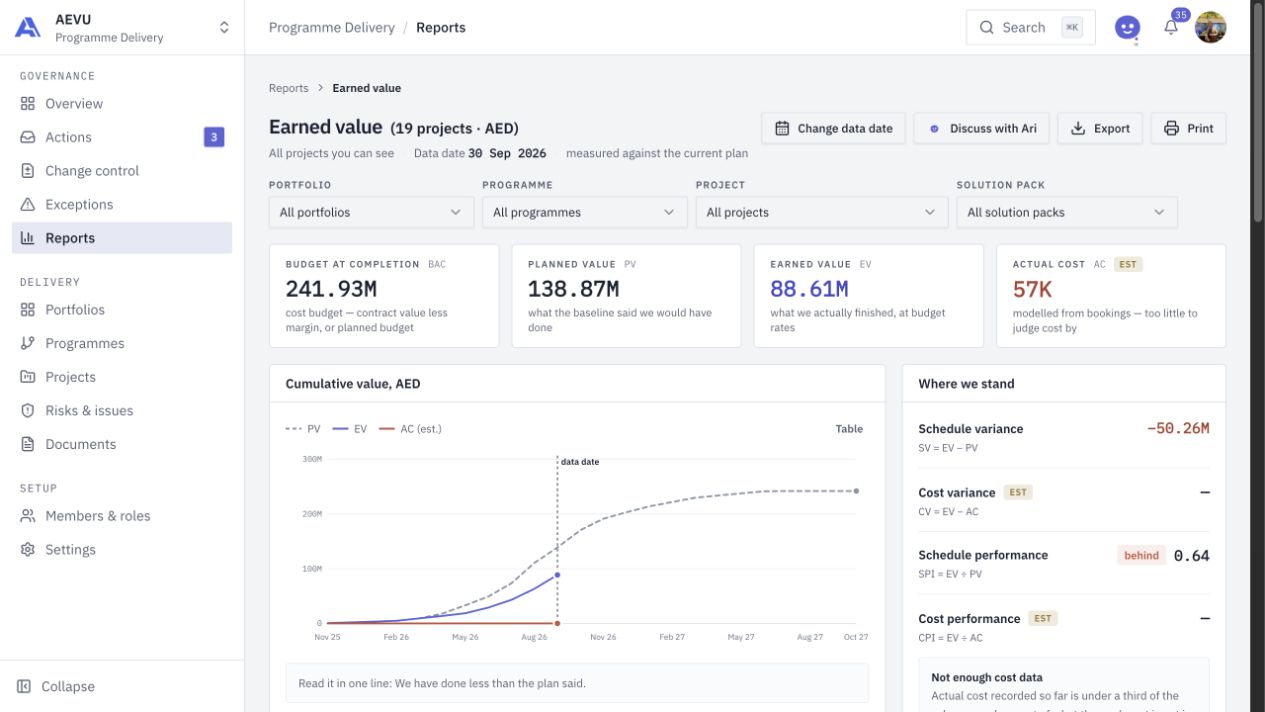
Bring the portfolio into the review meeting with eight connected reports. Inspect the scope, follow the underlying context and export the view you actually mean to share.
THE CONNECTED WORKFLOW
Portfolio health, earned value, financials, schedule performance, change control, risks and issues, resource utilisation, and governance each answer a different management question. They read the project records within the viewer’s authorised scope.
Filter by portfolio, programme and project. Where recorded, solution-pack and site-code filters help focus the analysis.
Read data dates, currency, baseline context and estimate labels alongside the figures. Missing or insufficient evidence should remain visible.
Export supported reports to Excel, CSV or a new Google Sheet, or print a clean page. Google exports require the appropriate connection and permissions.
FROM QUESTION TO ACTION
Open the report for the decision: delivery health, cost performance, exposure, capacity or governance.
Select the relevant projects and dates. Review the calculation notes and any limitations before drawing conclusions.
Use the report in your review, ask Ari about its current facts where enabled, or export the filtered snapshot.
THE REPORT COLLECTION
A CLOSER LOOK
Portfolio health, earned value, financial, schedule performance, change control, risk and issue, resource utilisation, and governance and compliance.
Yes. Supported exports preserve the requested scope and expose the report context. Available formats include Excel, CSV and a new Google Sheet, subject to policy and permissions.
When enabled, the report’s Ari entry uses the server-calculated facts for that report. It does not invent missing metrics or grant access to additional records.
BRING THE WHOLE PICTURE INTO FOCUS
Explore AEVU around a real workflow your team needs to improve.