See allocation in context
Project workload shows the current project alongside the person’s other bookings, making shared demand visible.

RESOURCE PLANNING & WORKLOAD
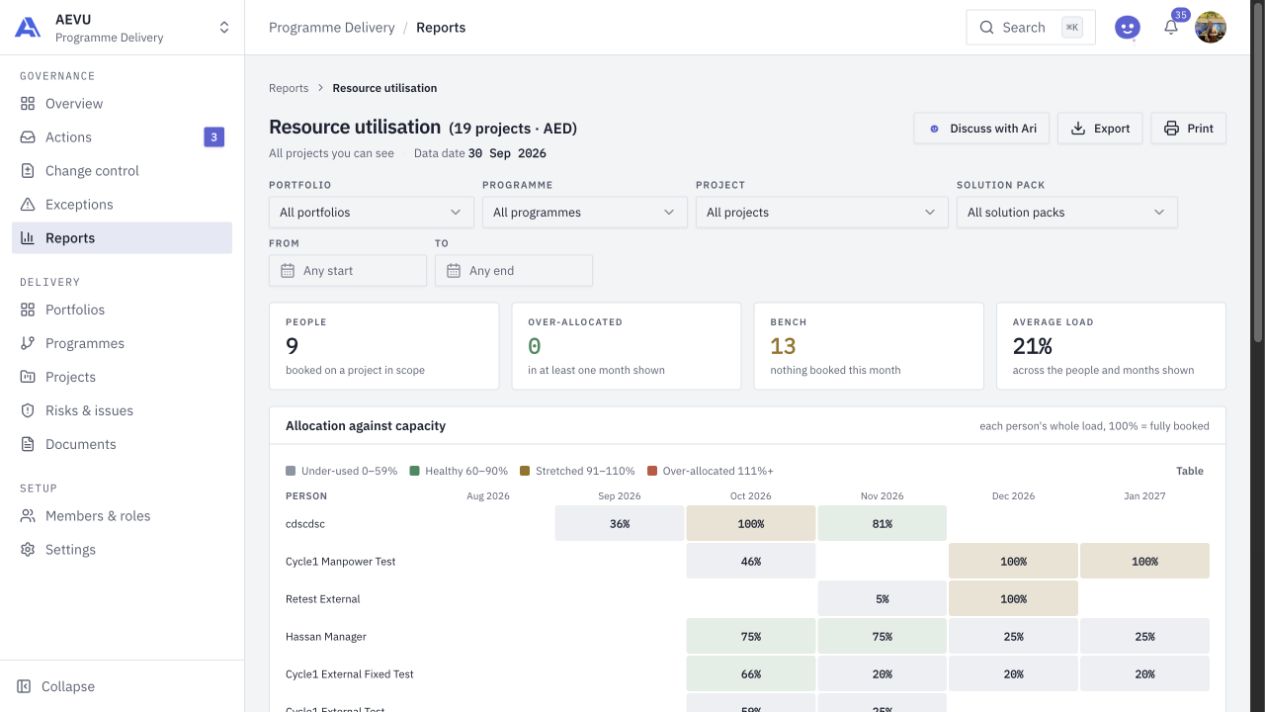
Connect delivery commitments to the people doing the work. Review allocation and capacity across projects, with utilisation thresholds that reflect your workspace.
THE CONNECTED WORKFLOW
A person can look available on one project while being stretched across several. AEVU brings bookings, working calendars and whole-person utilisation together so the team can inspect the competing commitments.
Project workload shows the current project alongside the person’s other bookings, making shared demand visible.
Working days, holidays and configurable utilisation bands give teams a consistent basis for reading workload.
Use the resource utilisation report to inspect allocation by person and month, over-allocation, the bench and permitted labour-cost information.
FROM QUESTION TO ACTION
Assign people or manpower to work through the project plan’s resource controls.
Read the project workload and the person’s total utilisation against the working calendar.
Discuss the competing commitments, adjust authorised bookings and review the portfolio effect.
A CLOSER LOOK
Yes. The project workload view distinguishes the current project from other bookings, and its colour follows the person’s total utilisation.
Yes. Workspace workload thresholds define the utilisation bands used across the supported workload surfaces.
Project workload has day, week and month views. The resource utilisation report supports a wider review of people and periods in the selected scope.
BRING THE WHOLE PICTURE INTO FOCUS
Explore AEVU around a real workflow your team needs to improve.